Requirements
Introduction
Requirements, specifications, and their traceability to implementation and tests, tracked with sphinx-needs.
Use Cases
Contributors keep using their build and dependency tooling, such as Cargo, alongside Bazel as the harmonized cross-component build system (US_BAZEL_HARMONIZED_BUILD). |
Contributors across multiple Eclipse SDV components build and manage dependencies through one shared Bazel-based system, enabling joint integration instead of per-component build silos. |
Stakeholders can follow a digital thread from a requirement through its technical specification to its test execution results, authored and tracked as code via Sphinx-Needs. |
User Story: Build execution on the Eclipse Common Build Infrastructure US_ECLIPSE_CBI_BUILD_EXECUTION
|
Projects get their builds executed on the shared Eclipse Common Build Infrastructure instead of maintaining bespoke, per-project CI. |
User Story: Pilot adoption by S-CORE, OpenSOVD, and Automotive API Framework US_PILOT_ADOPTION_SDV_PROJECTS
|
The harmonized build and doc-as-code approach is validated in practice by the Eclipse S-CORE, Eclipse OpenSOVD, and Eclipse Automotive API Framework pilot projects before wider rollout. |
Tool integrators can evaluate SIL KIT (Eclipse OpenXilEnv) as a candidate for integration into the harmonized toolchain. |
User Story: ISO 26262 tool classification for the harmonized tooling US_AUTOMOTIVE_QUALIFICATION_TOOLING
|
Safety engineers can classify the harmonized tooling against its ISO 26262 tool use cases and get the evidence needed to qualify it to the required Tool Confidence Level. |
Automotive Edge but exploring potential synergies between edge and cloud |
Any contributor, whether on macOS, Windows, or Linux, can build the combined website with a single command, without needing platform-specific scripts or manual multi-step instructions. |
Requirements
The system shall let a contributor build and manage dependencies for their component using its existing native build tool (e.g. Cargo) without adopting Bazel for that component. |
Requirement: Native build output integrates with the harmonized build REQ_NATIVE_TOOLING_OUTPUT_INTEGRATION
|
The harmonized build shall incorporate artifacts produced by a component’s native build tooling into the overall build output alongside Bazel-built components. |
When a component’s native build tooling fails, the build system shall report the failure attributed to that specific component. |
The harmonized build shall not require a contributor to migrate an existing component’s build definition to Bazel in order to remain part of the harmonized build. |
Deployment Requirements
Traceability table
ID |
Title |
Status |
Tags |
|---|---|---|---|
Native build tooling remains usable per component |
draft |
||
Native build failures are reported per component |
draft |
||
No mandatory migration to Bazel |
draft |
||
Native build output integrates with the harmonized build |
draft |
||
ISO 26262 tool classification for the harmonized tooling |
draft |
||
Bazel as the harmonized cross-component build system |
draft |
||
Build the website with one script on any OS |
open |
tooling |
|
Doc-as-Code artifacts with traceability |
draft |
||
Build execution on the Eclipse Common Build Infrastructure |
draft |
||
Automotive Edge |
draft |
||
Support for multi build systems |
draft |
||
Pilot adoption by S-CORE, OpenSOVD, and Automotive API Framework |
draft |
||
SIL KIT as a candidate integration target |
draft |
Traceability diagram

How we work
This page is not hand-written prose — every user story and requirement above
is a sphinx-needs {need} directive,
traced from use case down to requirement, architecture, implementation, and
test. The trace graph is authored and gated with two tools: ubcode, the
traceability engine, and Pharaoh, the AI-agent workflow built on top of
it.
Installation
You can install ubcode which includes ubc from the Visual Studio Code
Market place. ubcode does not need a licence if it is used on an open source
repo. Configure your LLM to use the AI skills described in the Pharaoh
section below.
ubcode: the traceability engine
ubcode (CLI: ubc) defines the V-model this project follows, configured in
ubproject.toml
at the repo root.
You can see the workflow via Pharaoh in Tailor workflow, details in the next chapter.
Pharaoh: AI-assisted authoring and review
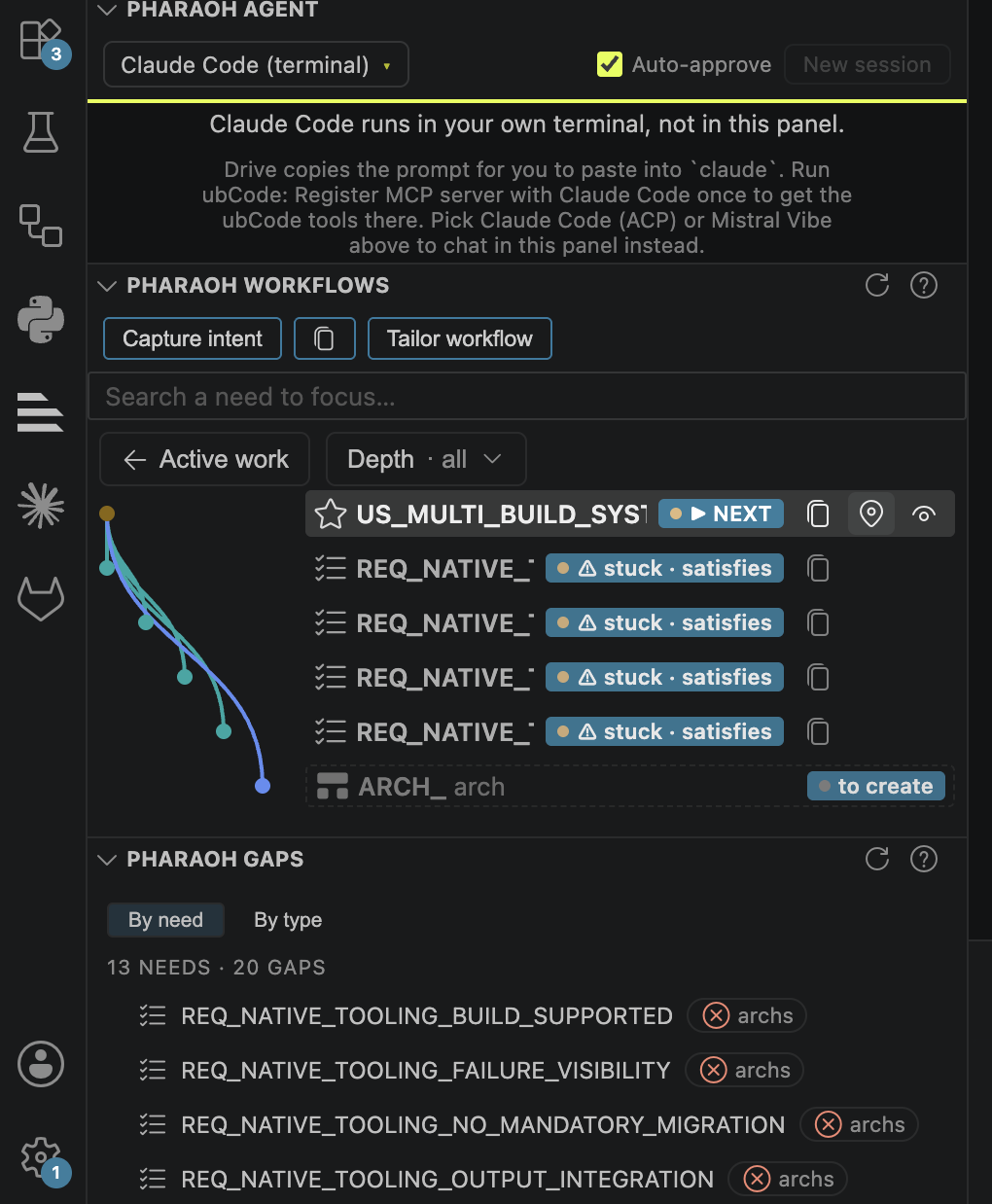
In Pharaoh Agent
you can configure your LLM.
In Pharaoh Workflow
you can add new use cases with
Capture intentyou can check the AI Workflow with
Tailor workflowyou can navigate to the current elements by selecting the navigation button
 for each of them.
you can proceed with the AI driven element generation by driving the next step or copy the next LLM commands

In Pharaoh Gaps
you can check on open topics and found issues.
Every need traces to its parent (traces_to, satisfies, implements,
verifies), and impl / test needs aren’t written by hand here — they’re
materialized from one-line marker comments in src/ and tests/ that link
back to the architecture element they realize or verify.
Pharaoh is the agentic layer that drives this graph stage by stage with AI
coding assistants (Claude Code, GitHub Copilot). Its state lives in
.pharaoh/: an install manifest tracking which skill files were installed
for which assistant, and .pharaoh/verdicts/ holding independent AI-review
verdicts for each authored need.
To advance the workflow one stage:
Run
/drive-workflow(Claude Code) — it callsubc agent nextto find the next stage, authors it with the matchingdraft-*skill after you approve an outline, then hands the result to a fresh reviewer context using the matchingreview-*skill.The reviewer scores the need against the criteria in
quality/*.tomland submits a verdict viaubc agent verdict-submit, written to.pharaoh/verdicts/<NEED_ID>.json.drive-workflowconfirmsubc agent gapsis clear and the verdict is fresh, reports what’s next, and stops — it advances exactly one stage at a time so a human stays in the loop.
ubc agent verdict-check (or ubc agent release-check --with-verdicts)
gates a release on both the structural trace graph and these review
verdicts being present and un-stale.